Monday, 23 May 2016

Completing the NPQML

I am very proud that I have recently been awarded a certificate in middle leadership - NPQML: National Professional Qualification for Middle Leadership.

I was already a middle leader at the time of starting the course, but felt like I had jumped into the position too soon (it initially started as a maternity cover for the head of department post that the previous post-holder then never wanted back). Luckily my (now previous) school were very encouraging in offering CPD opportunities and agreed to pay for me to do the course. I thought it would support me in becoming a good middle leader rather than just getting by and relying heavily on my team.

I attended Anglia Ruskin University in Chelmsford but you can do it at various academic institutions around the country. The course was made up of self study (reading), three face to face days, participating in an online forum following each face to face day, a write up of your learning for each face to face day then your main project assignment. The main project is of your choosing (along with your sponsor in your school); you have to lead a team to work on a school improvement priority.

I thoroughly enjoyed the process of learning something new, the self study, the face to face days and the follow up from them. It was nice to have something else to focus on that is different from the every day pressures in school.

In my school I was expected to work on something for "whole school" anyway being a UPS teacher, so I was able to use that for my final project too - two birds, one stone and all that. So technically, I wasn't really doing any extra work for the final project, other than writing up my findings which I did the majority of over the summer holidays.

The whole process of applying and completing the qualification was quite straight forward and easy to follow.

Have I used much of what I learnt over the course? Probably not in all honesty. Some things were more useful than others; data analysis was particularly useful and looking at how to use data. However, it definitely gave me the confidence to continue as a middle leader and I now feel much more comfortable in my role of responsibility.

I have seen people on twitter and other blog writers slate the qualification, saying that it is pointless. These people need to understand that not everyone progresses through their career with leadership skills built in and some people need to work harder than others to develop them.

If you are in a similar situation and offered the opportunity by your institution, then I'd definitely recommend the course.


Monday, 9 June 2014

Filofax as a teacher planner

Every year since the beginning of my teaching career I have had a teacher planner. I think I started with an A4 one in a folder, then downsized to an A5 spiral bound one. I love my A5 spiral bound, but I do find I end up with a lot of loose papers tucked in it, and then they fall out and I shove them back in the wrong place. It can get a bit messy.

I decided I waned to stay A5 size but actually be able to reorganise the planner and have those loose bits of paper secured. Introducing my new A5 pink apex filofax.


I bought it from the filofax website for £28 along with a portable A5 hole punch which was about £10.

Be warned, the portable hole punch was the biggest waste of £10. The following shows what it did to a single page...


Anyway, in the meantime at school we were asked what teacher planners we wanted for next year, so I asked for the A5 loose pages. Unfortunately these come ready punched with two holes, which are not in a great place for the filofax's 6 holes. (The two holes overlap with the 6 which looks a bit messy).

Speaking of hole punches, I have ordered a universal hole punch from Amazon which is being shipped from Japan. Hopefully it will arrive around the end of June.

Anyway back to the filofax. Mine came with a 2013 and 2014 calendar. I binned the '13 one and sold the '14 one on eBay, whilst ordering myself a 2014-15 academic year one. It also came with some coloured notes pages, 6 and 12 dividers.

I got the idea from my sister who is a filofax guru to make my own dividers. So I went to Hobbycraft and bought a pack of pretty pastel cardstock and got to work at making my own dividers. Half an hour later I ended up with these...


I am pretty happy with them, I just need to make some labels to go on the tabs. I will then cover the tabs in sticky back plastic to replicate the dividers the filofax actually comes with. I also had hole reinforcers, so have put them on the reverse of the dividers.

The six sections I plan to have at the moment are:
- calendar
- lesson plans
- classes
- monitoring (for my HOD role)
- meetings
- notes

Within classes, I may make a further 12 dividers (smaller tabs) so I have one for each class.

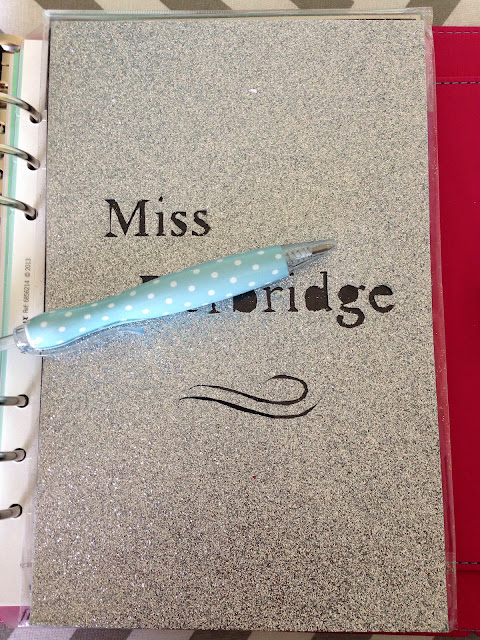
Finally I found a picture on Pinterest where someone had their name cut out on silver card and had a black sheet behind it to give a silhouette effect. I chatted to my sister about this and she offered to make me one. I think in the filofax world it's called a dashboard. I love it!


Once I really get into this, probably in September when I actually have something to put in it, I will write an updated post.

In the meantime, do you use your filofax as your teacher planner? Do you have any tips for me? Would love to read them in the comments below.

Friday, 14 March 2014

AS/A2 revision and collaboration

I had a really successful double with my year 13 Computing class on Thursday and wanted to share the plan with you. It is a small class of 7, and we have finished covering the course content so are now revising. 

To start, I had a list of topics on the board and asked the students to pick one (different) each. They then had an hour to create a Wordle of key words from their topic and prepare a 1 minute talk. They presented to the class with their Wordles displayed as inspiration for their talk. I also timed them and told them when their minute was up. 

The topic and Wordle really helped them to focus down to what they needed to cover. Also, getting them to present with the usual PowerPoint behind them meant that actually had to discuss their subject and not read off a set of slides.

What are your go-to revision activities?

Tuesday, 4 March 2014

Building theory whilst completing controlled assessments

Hands up if you spend a lot of lesson time (maybe too much?) focussing on controlled assessments?
 
Yes, me too.
 
It's so tempting to get in to a routine with these types of lessons where the students come in and just get on with their controlled assessments lesson after lesson.
 
However, as we all know if we teach courses that also have an exam; learning and revising the theory is equally important.
 
Welcome the "theory builder".
 
Myself and a couple of my colleagues came up with the idea of putting together a collection of theory questions and short activities that can be used as starters, plenaries, home works etc. I have just started work on this and I am currently taking past paper questions from Exampro to use.
 
This helps build the theory at the same time as getting through your controlled assessments.


Thursday, 30 January 2014

Easing the marking load

Today I discovered marking statement banks; it has changed my life.

I actually heard the idea of statement banks for marking floating around my school a couple of weeks ago. But it filled me with memories of writing crappy, unpersonal school reports a few years back by picking statements from a bank. Also the word "bank" scared me initially as it made me think that I'd need to write a lot of statements.

But today, the pile of marking on my desk was growing to a level that made me anxious. It was lunchtime, I had about half an hour, how was I going to make a significant indent on the pile?

I flicked through a pile of year 9 home works and looked for common strengths and areas for improvement. On a PowerPoint slide I wrote three what went wells, and three even better ifs. I numbered the WWW 1-3 and the EBIs A-C. The reality is, that if I am marking work in the WWW and EBI way anyway, I find myself repeating my comments over and over. If you have a wide enough range of comments to fit the work, it will still be personal enough.


Then it took me about 10 minutes to go through the kids work and write "1B" or "3A" etc. on each piece. I still pointed out spelling errors and so on on their work, and wrote a couple of personalised comments where my statements didn't fit.

Now, next lesson I will put my ppt slide up for all to see and the students can write their relevant comments on their work for me. This also helps them take ownership of their progress by writing out what they did well and what they need to improve.

This is going to make marking so much quicker. Try it!

Sunday, 5 January 2014

How to write learning objectives

Some teachers I know struggle with writing learning objectives. Having mentored numerous trainees in the past, it is surprising how many of them just don't get it and end up writing lists of tasks instead.

I remember being taught about learning objectives in my training and it made sense to me and it's never been something I have struggled with.

Somewhere along the line, I fell across Bloom's Rose:

http://iteachu.uaf.edu/files/2011/08/2000px-Blooms_rose.svg_.png
In the centre of the "rose" there are the 6 different levels from Bloom's taxonomy. Then moving outwards, there are various key trigger words that you can use to construct your objectives at each level. Finally on the outer part, there are possible activities you can set your students in order to help meet the objective you have written.

If you have ever struggled with objectives, then I recommend the next time you are stuck, use Bloom's rose. It's a great tool for your toolkit.

Happy new year!

Tuesday, 3 December 2013

How committed are you?

Today I got told that I had a lack of commitment towards being a head of department because I said no to going away for a second unpaid working weekend away this academic year. I have already committed to one.

This led towards me being in a bad mood all day and just wondering how much more committed I could possibly be?

I have literally given up parts of my life and things that I enjoy because of my job. I used to go to the gym. Now I work so many extra hours and am too shattered to even consider it. I speak to my parents and siblings a lot less than I'd like to because I am normally too busy or if not, too tired to ring. Or I'm stressed about work so don't want to ring because I know they'll be able to tell I'm down. I don't get to spend quality time with my boyfriend most evenings on a work night as I'm working. I can't cook a decent dinner because I'm worried it will take too long. I have broken nights sleep because I'm stressed about work. It never ends.

I understand as head of department I have a lot of responsibility, I get paid more and I need to have a high level of commitment. However, where is the line?

Monday, 24 June 2013

Revision lessons


It's that time of year when the exams are upon us and we are all doing lots of revision sessions for students. There comes a point when you get to your revision lesson and wonder how you can deliver the material differently to make it less repetitive for the students.

The purpose of this post is for me to record a list of revision lesson/activity ideas that I have collected and used to share with you all. Also I find it quite handy to have a toolkit of the things that I have used so I don't forget them!

1. Multiple choice quiz using either Socrative or the Promethean Race Car Game

2. Mount past paper questions on bigger paper and allow students to work in groups to annotate the questions first - what sort of response is being looked for? What are the key points on that topic? Then structure their answer

3. Higher level thinking activity where students are given an image related to the topic and there are a set of four questions round the outside to delve in to what the topic is about, such as:
  • What is it? 
  • How does it work? 
  • What does it do? 
  • How do you use it?

Higher level thinking activity

4. Pass the question - give the students an exam question to answer and a mini whiteboard to pass around. They are all only allowed to contribute one word each time they get the whiteboard. Once they have written their word the whiteboard gets passed on to the next person to add a word to gradually build up the answer.

5. Write a song - give the students a print out of the lyrics of a popular song (don't let them chose a song - it takes forever!) and they have to rewrite the lyrics with a revision topic.

6. Padlet - Padlet.com is an amazing teaching tool. It basically enables you to set up a wall/electronic pinboard where you can put different resources eg. text, images, links etc and can be contributed to collaboratively. As a revision lesson tool, particularly for key stage 5, I get students to collaboratively contribute to a padlet by giving them topics that they need to produce revision for to upload on to the padlet.

Below is one I created for my GCSE ICT students where they can access all of the revision material in one place.

padlet revision
Padlet revision
7. Wordle presentations - how many times have you asked students to prepare and present to the class to then listen to 20 of them read out the slides they are displaying? The Wordle presentation forces them to present without reading off a slide.

First of all, give students a topic or section of the specification. Get them to pick out the key words and create a wordle. Then get them to prepare a 2/3 minute talk on the topic. When presenting to the class, they can only have the Wordle on display and in front of them for stimulus.

wordle revision
Wordle


8. Stop motion animation - students create a stop motion animation using mini whiteboards or similar on a given topic.

Stop motion animation revision
Stop motion animation


Keep an eye on this post as it is a working progress.

Thanks

Thursday, 21 February 2013

Promoting Computing to your students

Here is a collection of links and resources to help promote Computing or Computer Science to your students.

www.whatiscomputing.com

Promo video

Posters (think you have to be logged in to CAS Online to view)

Prezi 

Video on why students should learn to write code

I will add to this post as and when I come across more useful resources. Please feel free to comment below and let me know of any I've missed and I'll add them to the post.


Wednesday, 20 February 2013

Internet and networks vocabulary worksheet

Happy half term everyone!

I can see on Twitter most teachers are working throughout this half term, as am I. I am writing a year 9 Computing unit on Communication and the Internet, so I thought I'd take a break to share a resource with you that I have just created. If this was printed it would still be warm!

It's a matching activity for some Internet and network key terms.


It could be used for ICT as well as Computing. You could either use it as a worksheet or cut it out for the kinaesthetic learners. Might be a nice little starter, plenary or homework activity.

Here is the resource.

Monday, 21 January 2013

Some basic Visual Basic tasks

Useful for either recapping, homework, a mini test or extension work.

There are 6 questions that ask students to write some simple Visual Basic programs, each question increases in difficulty. It also contains solutions.

The resource is here.

Friday, 11 January 2013

Objective Led Learning

I was a joint leader in an 'objective led learning' working group a little while ago. We were tasked with researching and trying different techniques then creating a handout for the rest of the staff.

Everybody came up with some great ideas and we produced a really helpful handout.


I suggest you try post-it note objectives with controlled assessment or coursework based lessons. This is personal favourite of mine that I picked up during my training year. Or getting the students to RAG the objectives at the start and then again at the end of the lesson to use as an assessment tool to show progression is a handy technique.

Which are your favourites?

You can download the handout here.

Tuesday, 8 January 2013

The 5 minute lesson plan

At our staff meeting today we were introduced to the "5 minute lesson plan" from the teachers toolkit. Now this is something I can get on board with!

It looks quite straightforward to fill in, though I am having a bit of difficulty in getting to grips with "stickability".


Another bonus is that it is apparently Ofsted friendly!

I shall definitely be giving this a go. In fact, I've already planned a lesson tomorrow using it.

Download it here.